
I still remember standing in long queues outside the municipal office in Hyderabad, clutching paper challans and hoping I hadn’t missed the payment window for my house.
Those days are gone now, thanks to a genuine digital push by the Commissioner and Director of Municipal Administration across Telangana.
Whether your property sits inside GHMC limits or under any other Urban Local Body (ULB), you can now handle your Telangana property tax online payment in a few simple clicks, using either the GHMC portal or eMunicipal Telangana.
This guide covers everything property owners actually need: finding your PTIN, walking through both portals, exploring accepted payment methods, understanding penalties for late payment.
Checking exemptions, and learning how to download your receipt once your property tax is paid, all online, without setting foot in a queue again.
What Is PTIN and Why You Need It
Every registered property in Telangana carries a unique number called PTIN, short for Property Tax Identification Number, and in some ULBs it’s still called the ASMT number.
This number is mandatory before you can check your tax dues, view your property details, or complete any online payment.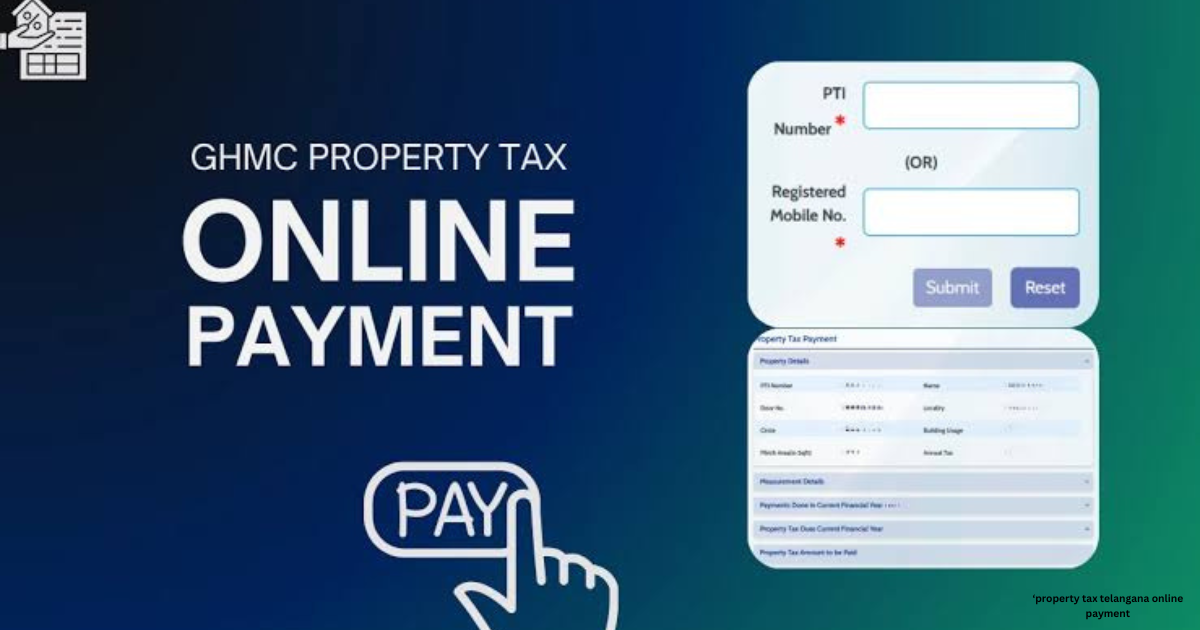 If you don’t have it handy, the official municipal portal lets you search using your door number, your owner name, or even your old assessment number to pull it up instantly.
How to Pay Property Tax Online via GHMC
For Hyderabad properties falling under the Greater Hyderabad Municipal Corporation, also known as GHMC limits, the process runs through the official GHMC Property Tax portal at onlinepayments.ghmc.gov.in.
Head to the Online Payments section, enter your PTIN along with your registered mobile number, then tap Get OTP and verify the OTP sent to your phone.
Once verified, your property details and outstanding tax amount appear right on screen; follow these steps, pick your preferred payment method, complete the transaction through the secure payment gateway, and download or print the receipt for your records.
How to Pay Property Tax Online via eMunicipal Telangana
If your home falls outside GHMC limits, in one of the many municipal corporations and municipalities spread across Telangana, the CDMA routes you through the eMunicipal Telangana website instead.
Open the Online Payments tab, select House Tax or Property Tax, then choose Property Tax Payment by Door No, pick your district and ULB from the dropdown, and enter your number, along with your door number. Click Get Property Details to see your dues, finish the payment through the payment gateway on the eMunicipal Telangana portal, and save your transaction receipt, since other ULBs rely on this same system for every property owner.
Accepted Payment Methods
Both GHMC and eMunicipal Telangana portals, plus third-party platforms like Paytm and PayZapp, give you plenty of payment modes to choose from: Credit Card, Debit Card, Net Banking, UPI, and Mobile Wallets.
Every one of these transactions runs through encrypted payment gateways, keeping your money secure from start to finish. Most platforms also add two-factor authentication using a PIN and OTP, so security never takes a back seat.
Penalty for Late Payment
Miss the due date for your property tax, and a penalty kicks in, calculated as a percentage of your overdue tax. The exact penalty amount and penalty charges depend on .
Property tax telangana online payment or ULB your property falls under, and continued non-payment only adds more interest over time.
Since most places split dues into two half-yearly instalments, paying before each late payment window closes saves you real money.
Print Your Property Tax Receipt
Once your payment successful confirmation appears, both GHMC and Municipal Telangana portals let you download or print your official receipt right away on the portal.
This receipt works as valid proof of payment, useful for property sale, mutation purposes, or simple future reference later on. Forgot to save one? Just use the Print Receipts option or Check Payment Status tool to pull up past receipts anytime.
Benefits of Paying Property Tax Online
Paying online means no more trips to crowded municipal offices, no manual challans, and far fewer errors in your dues. You get instant confirmation, a digital receipt, and the ability to track payment history whenever you need it.
Certain third-party platforms even throw in cashback and rewards on top of secure payment options, making every payment feel like a small win instead of a chore.
FAQs About Property tax telangana online payment
What is PTIN and where do I find it?
PTIN, or Property Tax Identification Number, is the unique identifier attached to your property, and you need it to check dues or pay tax online. You can find it printed on previous tax receipts, or look it up on the GHMC/eMunicipal portal using your door number or owner details.
How can I pay property tax online in Telangana without visiting the office?
Yes, you can pay property tax online anywhere in Telangana without visiting an office. For Hyderabad, use the GHMC portal with your PTIN and registered mobile number for OTP verification, and for other ULBs, the eMunicipal Telangana portal works the same way, letting you finish the payment using card, UPI, or net banking.
What happens if I miss the property tax due date?
If you miss the due date, a penalty gets added to your outstanding tax, worked out as a percentage of the overdue amount. The exact rate and rules depend on your local municipal corporation, so it’s best to check with them or clear your property tax early.
Can I pay property tax using my door number instead of PTIN?
Absolutely, on the eMunicipal Telangana portal, you can search using your door number, district, and ULB details even without your PTIN. This lets you pay your property tax without hunting down old paperwork first.
Is it safe to pay property tax online?
Yes, it’s completely safe to pay property tax online through official government portals and other authorized third-party payment platforms. These use encrypted, secure payment gateways with OTP/PIN-based two-factor authentication, so your money and details stay protected.
How do I get a receipt after paying property tax online?
The moment your payment successful message shows up while paying property tax online, you can instantly download or print the receipt straight from the portal. Keep it safe, since it works as your official proof of payment.
Can NRIs or property owners outside Telangana pay property tax online?
Yes, NRIs and property owners living outside Telangana can easily pay property tax online since the entire process only needs your PTIN/door number and payment details. You can complete it from anywhere in the world, no travel required.